//指定YouTube Video ID序號, 例如:YHLWdb55iicvar myVideoID:String = "9evx8PZEMKU";
//自動播放:true, 不自動播放:false
var autoPlayVideo:Boolean = false;
//重覆播放:true, 不重覆播放:false
var loopVideoState:Boolean = false;
//聲音大小,最大100,最小:0 (無聲)
var myVolume:Number = 30;
//有聲:false, 無聲:true
var muteVideoState:Boolean = false;
//指定影片尺寸, 寬(videoWidth), 高(videoHeight)
var videoWidth:Number = 330;
var videoHeight:Number = 245;
//Below Functions Are Edited By Perr Tang
var autoPlayState:String;
if (autoPlayVideo == true) {
autoPlayState = "&autoplay=1";
} else {
autoPlayState = "";
}
var myVideoURL:String;
if (useControlPanelState == true) {
myVideoURL = "http://www.youtube.com/v/" + myVideoID + autoPlayState;
} else if (useControlPanelState == false) {
myVideoURL = "http://www.youtube.com/apiplayer?version=3&video_id=" + myVideoID+autoPlayState;
}
Security.allowDomain("www.youtube.com");
// create a MovieClip to load the player into
var ytplayer:MovieClip = _root.createEmptyMovieClip ("ytplayer", 1);
// create a listener object for the MovieClipLoader to use
var ytPlayerLoaderListener:Object = {onLoadInit:function () {
// When the player clip first loads, we start an interval to
// check for when the player is ready
loadInterval = setInterval (checkPlayerLoaded, 250);
}};
var loadInterval:Number;
function checkPlayerLoaded ():Void {
// once the player is ready, we can subscribe to events, or in the case of
// the chromeless player, we could load videos
if (ytplayer.isPlayerLoaded ()) {
ytplayer.setSize (videoWidth,videoHeight);//指定影片大小
trace ("width= " + videoWidth + " and height= " + videoHeight);
ytplayer.setVolume (myVolume);
if (muteVideoState == true) {
ytplayer.mute ();
}
ytplayer.addEventListener ("onStateChange",onPlayerStateChange);
ytplayer.addEventListener ("onError",onPlayerError);
clearInterval (loadInterval);
}
}
function onPlayerStateChange (newState:Number) {
trace ("New player state: " + newState);
if (newState == "0") {
if (loopVideoState == true) {
ytplayer.playVideo ();
} else {
ytplayer.stopVideo ();
}
}
}
function onPlayerError (errorCode:Number) {
trace ("An error occurred: " + errorCode);
}
// create a MovieClipLoader to handle the loading of the player
var ytPlayerLoader:MovieClipLoader = new MovieClipLoader ();
ytPlayerLoader.addListener (ytPlayerLoaderListener);
// load the player
ytPlayerLoader.loadClip (myVideoURL,ytplayer);
//ytPlayerLoader.loadClip("http://www.youtube.com/v/9evx8PZEMKU?version=3&loop=1&playlist=9evx8PZEMKU", ytplayer);

星期四, 3月 31, 2011
AS2: 用Flash播放YouTube裡的影片[一定得用控制面版版]
至於AS2控制YouTube影片的部份,Google也是有提供AS2 For YouTube Video的參考資料,但目前看來,似乎無法不使用Google提供的Video控制面版…


AS3: 用Flash播放YouTube裡的影片[加強版]
後來發現,人的需求是愈來愈高,一下子要這個功能,一下子又要那個功能…所以我把目前遇到所有「想要」的功能,寫成了一個ActionScript 3.0的程式碼,現在應該都有了吧!~~
//指定YouTube Video ID序號, 例如:YHLWdb55iic
var myVideoID:String = "YHLWdb55iic";
//自動播放:true, 不自動播放:false
var autoPlayVideo:Boolean = true;
// 用控制面版:true, 不用控制面版:false
var useControlPanelState:Boolean = false;
//重覆播放:true, 不重覆播放:false
var loopVideoState:Boolean = true;
//聲音大小,最大100,最小:0 (無聲)
var myVolume:Number = 10;
//有聲:false, 無聲:true
var muteVideoState:Boolean = false;
//指定影片尺寸, 寬(videoWidth), 高(videoHeight)
var videoWidth:Number = 300;
var videoHeight:Number = 215;
//Below Functions Are Edited By Perr Tang
var autoPlayState:String;
if(autoPlayVideo == true){
autoPlayState = "&autoplay=1";
}else{
autoPlayState = "";
}
var myVideoURL:String;
if(useControlPanelState == true){
myVideoURL = "http://www.youtube.com/v/" + myVideoID+"?version=3"+autoPlayState;
}else if(useControlPanelState == false){
myVideoURL = "http://www.youtube.com/apiplayer?version=3&video_id=" + myVideoID+autoPlayState;
}
// The player SWF file on www.youtube.com needs to communicate with your host
// SWF file. Your code must call Security.allowDomain() to allow this
// communication.(設定允許跨網域連到youtube.com)
Security.allowDomain("www.youtube.com");
// This will hold the API player instance once it is initialized.
var player:Object;
var loader:Loader = new Loader();
loader.contentLoaderInfo.addEventListener(Event.INIT, onLoaderInit);
//loader.load(new URLRequest("http://www.youtube.com/apiplayer?version=3&video_id=YHLWdb55iic&autoplay=1"));
loader.load(new URLRequest(myVideoURL));
function onLoaderInit(event:Event):void {
addChild(loader);
loader.content.addEventListener("onReady", onPlayerReady);
loader.content.addEventListener("onError", onPlayerError);
loader.content.addEventListener("onStateChange", onPlayerStateChange);
loader.content.addEventListener("onPlaybackQualityChange",
onVideoPlaybackQualityChange);
}
function onPlayerReady(event:Event):void {
// Event.data contains the event parameter, which is the Player API ID
trace("player ready:", Object(event).data);
// Once this event has been dispatched by the player, we can use
// cueVideoById, loadVideoById, cueVideoByUrl and loadVideoByUrl
// to load a particular YouTube video.
player=loader.content;
// Set appropriate player dimensions for your application
player.setSize(videoWidth, videoHeight);//指定影片大小
player.setVolume(myVolume);
if(muteVideoState == true){
player.mute();
}
}
function onPlayerError(event:Event):void {
// Event.data contains the event parameter, which is the error code
trace("player error:", Object(event).data);
}
function onPlayerStateChange(event:Event):void {
// Event.data contains the event parameter, which is the new player state
trace("player state:", Object(event).data);
if(Object(event).data == "0"){
if(loopVideoState == true){
player.playVideo();
}else{
player.stopVideo();
}
}
}
function onVideoPlaybackQualityChange(event:Event):void {
// Event.data contains the event parameter, which is the new video quality
trace("video quality:", Object(event).data);
}
星期六, 2月 26, 2011
AS3: 用Flash播放YouTube裡的影片
今天遇到了一個用Flash播放youtube影片的問題,雖然有提供「可能」可以用的網站連結參考,但短時間還是試不出個所以然,所以回家後就google了一下,看看是否有別的方法…結果,還真的有方法!…
其實Google有針對自己的Player提出控制方法,請參考:YouTube ActionScript 3.0 Player API Reference ( http://code.google.com/intl/zh-TW/apis/youtube/flash_api_reference.html )
方法其實非常簡單!只是…不知道的人冤枉路就會走得很久遠…
首先,先找到你的youtube分享連結,例如孫燕姿的新歌:「世說心語」MV完整版,它的分享連結是:http://www.youtube.com/watch?v=pgdgaDdNgwo,「v=」後面就是它的影片ID(video id),也就是「pgdgaDdNgwo」;這個ID很重要,因為我們它關係著我們要播的是哪支影片。
接下來把底下的ActionScript 3.0的語法貼到時間軸裡,並且將紅色的video id取代成你的youtube影片id就OK了:
其實Google有針對自己的Player提出控制方法,請參考:YouTube ActionScript 3.0 Player API Reference ( http://code.google.com/intl/zh-TW/apis/youtube/flash_api_reference.html )
方法其實非常簡單!只是…不知道的人冤枉路就會走得很久遠…
首先,先找到你的youtube分享連結,例如孫燕姿的新歌:「世說心語」MV完整版,它的分享連結是:http://www.youtube.com/watch?v=pgdgaDdNgwo,「v=」後面就是它的影片ID(video id),也就是「pgdgaDdNgwo」;這個ID很重要,因為我們它關係著我們要播的是哪支影片。
接下來把底下的ActionScript 3.0的語法貼到時間軸裡,並且將紅色的video id取代成你的youtube影片id就OK了:
// The player SWF file on www.youtube.com needs to communicate with your host
// SWF file. Your code must call Security.allowDomain() to allow this
// communication.(設定允許跨網域連到youtube.com)
Security.allowDomain("www.youtube.com");
// This will hold the API player instance once it is initialized.
var player:Object;
var loader:Loader = new Loader();
loader.contentLoaderInfo.addEventListener(Event.INIT, onLoaderInit);
loader.load(new URLRequest("http://www.youtube.com/apiplayer?version=3&video_id=pgdgaDdNgwo")); //換成你的video_id
function onLoaderInit(event:Event):void {
addChild(loader);
loader.content.addEventListener("onReady", onPlayerReady);
loader.content.addEventListener("onError", onPlayerError);
loader.content.addEventListener("onStateChange", onPlayerStateChange);
loader.content.addEventListener("onPlaybackQualityChange",
onVideoPlaybackQualityChange);
}
function onPlayerReady(event:Event):void {
// Event.data contains the event parameter, which is the Player API ID
trace("player ready:", Object(event).data);
// Once this event has been dispatched by the player, we can use
// cueVideoById, loadVideoById, cueVideoByUrl and loadVideoByUrl
// to load a particular YouTube video.
player = loader.content;
// Set appropriate player dimensions for your application
player.setSize(640, 390);//指定影片大小
player.playVideo(); //讓影片立刻播放
}
function onPlayerError(event:Event):void {
// Event.data contains the event parameter, which is the error code
trace("player error:", Object(event).data);
}
function onPlayerStateChange(event:Event):void {
// Event.data contains the event parameter, which is the new player state
trace("player state:", Object(event).data);
}
function onVideoPlaybackQualityChange(event:Event):void {
// Event.data contains the event parameter, which is the new video quality
trace("video quality:", Object(event).data);
}
星期一, 8月 30, 2010
AS3: 找到最高圖層深度(getNextHighestDepth)
在以前AS2的時候,有個語法可以找到指定物件的最高圖層深度:
因為聽說Flash會自動幫我們排序!聽起來真的是很聰明!
但它還是沒有辦法把我們想要的東西放到最上面的圖層!
只要有東西擋在眼前,我們就會覺得很不舒服!
所以我們找到了可以用的方法!
假設我們希望topMovieClip可以在最上面的話:
this.getNextHighestDepth();然而,當我們改用AS3的時候就發現…再也沒有這個功能了!
因為聽說Flash會自動幫我們排序!聽起來真的是很聰明!
但它還是沒有辦法把我們想要的東西放到最上面的圖層!
只要有東西擋在眼前,我們就會覺得很不舒服!
所以我們找到了可以用的方法!
假設我們希望topMovieClip可以在最上面的話:
相關連結:http://space.flash8.net/space/?246908/viewspace-382644.html//用「numChildren-1」找到母影片片段(parent)的最高深度var highestDepth:uint=topMovieClip.parent.numChildren-1;//用setChildIndex來設置最高深度
topMovieClip.parent.setChildIndex(topMovieClip,highestDepth);
AS3: Flash先暫停幾秒後再播放
不止是AS2可以先暫停幾秒後再播放,AS3同樣也可以!怎麼做呢?
假設我們要暫停8秒鐘再繼續:
假設我們要暫停8秒鐘再繼續:
//先暫停在目前的時間軸上
stop();
//新增一個Timer(mcTimer)
//用Timer宣告我們要在8秒後做某件事情「一次」
var mcTimer:Timer = new Timer(8000,1);
//監聽這個Timer(mcTimer)時間到了要做什麼事
mcTimer.addEventListener(TimerEvent.TIMER, timerHandler);
//其實要做的事就只有一個:play();
function timerHandler(e:TimerEvent):void {
play();
}
//開始讀秒(1秒、2秒、…)
mcTimer.start();
星期日, 11月 01, 2009
Lightroom 3 BETA
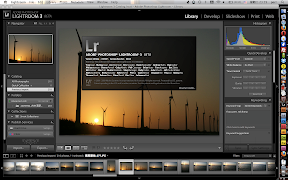
Photoshop Lightroom 3已經在Adobe Labs推出beta試用版,有興趣的人可以下載來玩玩。我個人試用後的感覺,似乎沒有和前一版的Lightroom 2有太大的差別,或者說是大幅度的提昇;唯獨照片在經過「預載」後,速度已經是變得非常快了!不像之前,不管有沒有看過照片的大圖或縮圖,都得再等2秒鐘顯示精確的照片!然而,現在的我似乎也不知道自己是否應該對它有所期待什麼…畢竟Photoshop Lightroom 2就滿好用的了。
星期五, 10月 09, 2009
AS2/AS3:Flash讀取外部資料到動態文字欄位
如果我們想在Flash中顯示目前觀看頁次(Page View)的數字訊息,可以透過伺服器將數字動態存取於某個檔案中,也許是純文字檔或ASP/PHP檔,再讓Flash去讀這個檔案來達到動態更新文字的效果!
在AS2中,我們將使用"LoadVars"的方法,讀取"counts.txt"這個外部純文字檔,並將其內容更新至實體名稱為"countNumbers"的動態欄位上;其中,"counts.txt"的文字內容很簡單,什麼都沒有就只有數字而已,內容如下:
至於AS3,則是採用"URLLoader"的作法:
在AS2中,我們將使用"LoadVars"的方法,讀取"counts.txt"這個外部純文字檔,並將其內容更新至實體名稱為"countNumbers"的動態欄位上;其中,"counts.txt"的文字內容很簡單,什麼都沒有就只有數字而已,內容如下:
23000000接下來填入底下的Actionscript:
var lv:LoadVars = new LoadVars();結果將會使實體名稱為"countNumbers"的這個動態欄位顯示出底下的文字:
lv.onData = function(theText:Number) {
countNumbers.text = "累計人次:"+theText+"人";
}
lv.load("counts.txt");
累計人次:23000000人Flash-Creations.com的Reading a Text File and Using it in Flash有更多完整的敘述。
至於AS3,則是採用"URLLoader"的作法:
var myTextLoader:URLLoader = new URLLoader();
myTextLoader.addEventListener(Event.COMPLETE, onLoaded);
function onLoaded(e:Event):void {
countNumbers.text = "累計人次:"+e.target.data+"人";
}
myTextLoader.load(new URLRequest("counts.txt"));
星期四, 10月 08, 2009
Fireworks CS4無法開啟Illustrator檔案
今天在用Adobe Fireworks CS4開啟Adobe Illustrator CS4製作的網頁檔案時,竟然出現:「An Internal Error Occurred(發生內部錯誤)」的訊息,一時之間,有些覺得百思不解,於是Google了一下…在Adobe Fireworks Forum(Fireworks論壇)一篇「FW CS3 - Internal Error」的回應中找到了答案:
其實Fireworks無法對Illustrator的外部連結檔案做有效的處理,因此造成開啟失敗!所以我把Illustrator內所有的外部(linked file)檔案都內崁(Embed file)進來,果然問題就解決了!哈哈~
星期一, 10月 05, 2009
Mac:取消Photoshop中Mac的多重觸碰面板放大縮小、旋轉功能
Dan Warne的部落格提到一個「在Photoshop中取消Mac的多重觸碰面板放大縮小、旋轉」的功能,這功能只有使用新版MacBook/MacBook Pro/MacBook Air的人會有感覺,因為Multi-Touch的多重觸碰功能很容易讓你難以掌握Photoshop!
首先到Adobe下載外掛程式:
http://www.adobe.com/support/downloads/detail.jsp?ftpID=4337
接著把下載的Plugin檔案放到:
應用程式 > Photoshop > Plugins 資料夾裡,重新啟動Photoshop即可。
首先到Adobe下載外掛程式:
http://www.adobe.com/support/downloads/detail.jsp?ftpID=4337
接著把下載的Plugin檔案放到:
應用程式 > Photoshop > Plugins 資料夾裡,重新啟動Photoshop即可。
星期一, 7月 13, 2009
AS3:路徑(Path)大不同!
Actionscript 3.0的路徑與我們在之前2.0使用的情形不一樣。_root.myMovie在AS3變成了MovieClip(root).myMovie,this._parent._parent.myMovie在AS3則變成了MovieClip(this.parent.parent).myMovie。
其中,this在AS2原本可指物件本身,但在AS3則一律只能指向時間軸所在的位置,而不是物件本身;MovieClip(this)則可指向時間軸所在的物件本身(Object MovieClip);MovieClip(root)指的則是主時間軸(Object MainTimeLine)。
其中,this在AS2原本可指物件本身,但在AS3則一律只能指向時間軸所在的位置,而不是物件本身;MovieClip(this)則可指向時間軸所在的物件本身(Object MovieClip);MovieClip(root)指的則是主時間軸(Object MainTimeLine)。
星期三, 7月 01, 2009
Photoshop Lightroom發佈2.4更新

Adobe Photoshop Lightroom 2.4又有更新可以下載了。更新的部份增加了幾乎所有最新機種的相機,例如Canon 500D、Nikon D5000、Sony A380、Pentax K-7、Hasselblad、…等,當然也修改了之前的一些問題,羅列如下,有興趣了解的人可以看一看:
- Web galleries with a Collection Title of six characters would not export or upload
- The crop aspect ratio could revert to the last selected ratio even when reset to original
- The crop aspect ratio in Quick Develop could be lost after a crop adjustment
- The crop aspect ratio lock could be lost after an orientation switch
- Images could preview incorrectly when imported using the MTP/PTP USB protocol
- Sony .ARW files may not have been recognized by Lightroom’s import dialog
- The Japanese language configuration of Lightroom on Mac OS X 10.5 could fail to switch to the print module if the HP B9180 was set as the default printer
- Metadata options that are intended for use were dimmed incorrectly when exporting DNG files
- The Japanese language configuration of Lightroom on Mac OS X was missing a shortcut for “Zoom Out”
- Several translation and shortcut corrections were made for the eight additional languages introduced with Lightroom 2.3
星期日, 5月 31, 2009
免費且合法的Flex Builder Professional 3

Adobe提供特定使用者(Education Customers/Professional Developers)免費而且合法的Flex Builder Professional版本。如果你符合條件,只要連至「freeriatools.adobe.com」,即可獲得合法序號與使用權唷!真的是太棒了!唯一可惜的是…我並不符合這個特定的資格…orz!
星期六, 5月 30, 2009
取消Photoshop兩指旋轉畫布的功能
如果你使用新的MacBook,多重觸碰面板(Multi-Touch Trackpad)在Adobe Photoshop CS4裡可以直接使用兩指旋轉的功能來旋轉畫布,是個滿有趣的功能!只不過…有些人並不「欣賞」這樣的功能;於是,Adobe釋出了一個外掛程式可以取消它:「Adobe Photoshop CS4 Disable Canvas Rotation Via Trackpad plug-in」。
取消的方法是先下載外掛程式,然後將它(DMG裡的外掛程式)放到「Adobe Photoshop CS4/Plug-ins」資料夾,重新啟動Photoshop CS4就可以了。
取消的方法是先下載外掛程式,然後將它(DMG裡的外掛程式)放到「Adobe Photoshop CS4/Plug-ins」資料夾,重新啟動Photoshop CS4就可以了。
星期六, 5月 23, 2009
Photoshop快速鍵:填滿…
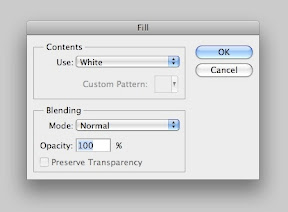
那天看到小遙在使用Photoshop填滿色彩(Fill...)的功能,突然就想到,這個功能有沒有超方便的快速鍵?
先說明一下這個功能,它會顯示出對話窗,讓你選擇用什麼來填滿目前的圖層,可以是「前景色、背景色、自訂色彩、材質圖、黑色、白色、50%黑的灰色」等。有時候可說是滿好用的一個功能。
我們在Photoshop功能列「編輯(Edit)>填滿(Fill...)」的下拉選單旁邊就可以看到快速鍵提示:「Shift+F5」。不過這個快速鍵似乎沒那麼好記…我們知道,填滿前景色的快速鍵是「Option+Delete(PC:Alt+Delete)」,填滿背景色的快速鍵是「Command+Delete(PC:Ctrl+Delete)」,其實填滿色彩的快速鍵也可以搭配Delete鍵:「Shift+Delete」。
所以,Photoshop真的藏了很多好用的快速鍵…
星期六, 5月 16, 2009
解決swf重疊的問題
前陣子同事遇到一個情形就是好幾個swf的flash元件重疊在一起,結果會造成顯示畫面的錯亂…特別是當我們指定某個影片一定要在最上面播放的時候…
原來我們想說是z-index的問題,雖然說z-index的設定得配合使用「position:absolute;」才行,但這點似乎無法解決我們的問題。
在經過一番Google之後,一時間也沒什麼答案,但我們的哈學長居然找到了一個很可能解決的答案,而且,最重要的是這答案確實是讓我們的影片顯示在畫面的最上層,不會被其它swf擋住。
更有趣的是,這方法竟然很簡單,只要將你想放在最上層的swf加上「透明度(transparent)」參數設定,並且確定其它swf「沒有」同時使用透明度設定;此時瀏覽器便使將設有透明度的swf放在最上層。swf的透明度參數設定如下:
假如其它swf也有使用這個透明度設定的話,一樣會造成顯示上的問題。也因並如此,沒必要的話最好不要在swf上有太多重疊的東西,否則很容易會有問題的發生…
原來我們想說是z-index的問題,雖然說z-index的設定得配合使用「position:absolute;」才行,但這點似乎無法解決我們的問題。
在經過一番Google之後,一時間也沒什麼答案,但我們的哈學長居然找到了一個很可能解決的答案,而且,最重要的是這答案確實是讓我們的影片顯示在畫面的最上層,不會被其它swf擋住。
更有趣的是,這方法竟然很簡單,只要將你想放在最上層的swf加上「透明度(transparent)」參數設定,並且確定其它swf「沒有」同時使用透明度設定;此時瀏覽器便使將設有透明度的swf放在最上層。swf的透明度參數設定如下:
<param name="wmode" value="transparent">
假如其它swf也有使用這個透明度設定的話,一樣會造成顯示上的問題。也因並如此,沒必要的話最好不要在swf上有太多重疊的東西,否則很容易會有問題的發生…
AS2影片播放完畢後執行特定動作
今天在公司試著想把Flash的影片在一開始的時間不要自動播放,讓使用者想看的時候再按下預覽視窗裡面的播放箭頭才播放影片;由於公司使用的是Flash 8,想當然爾,自然是用AS2來達到這個功能。做法如下:
首先將Flash的影片播放組件命名my_FLVPlybk為它的實體名稱。在影片的第一個影格事先放置示意的圖案,並命名為preview_btn。當我們按下這個預覽按鈕時,就告訴Flash把影片帶至第二個影格(設定影格名稱為theVideo)停住,並按放影片播放組件所指定的影片畫面。
第一個影格的as2程式碼:
//當flash到theVideo的時候,會觸發該時間軸上預先設定的AS2程式。至於「theVideo」這個時間點上的時間軸程式語法如下,原則上是使用listenerObject來監聽一些動作:
基本上就是在影片播完「停住」以後才會觸發另外的動作,如果是要影片在完成(complete)播放後觸發某些動作,也可以使用底下的as2程式碼:
首先將Flash的影片播放組件命名my_FLVPlybk為它的實體名稱。在影片的第一個影格事先放置示意的圖案,並命名為preview_btn。當我們按下這個預覽按鈕時,就告訴Flash把影片帶至第二個影格(設定影格名稱為theVideo)停住,並按放影片播放組件所指定的影片畫面。
第一個影格的as2程式碼:
preview_btn.onRelease = function(){
this._parent.gotoAndStop("theVideo");
//告訴flash到上一層時間軸的「theVideo」停住
}
//當flash到theVideo的時候,會觸發該時間軸上預先設定的AS2程式。至於「theVideo」這個時間點上的時間軸程式語法如下,原則上是使用listenerObject來監聽一些動作:
import mx.video.*;
var listenerObject:Object = new Object();
listenerObject.stopped = function(eventObject:Object):Void {
gotoAndStop("theVideo");
到指定的時間軸位置停住不播放。
};
my_FLVPlybk.contentPath = "myvideo.flv";
//指定my_FLVPlybk這個影片播放程式的位置。
my_FLVPlybk.setBufferTime(7);
my_FLVPlybk.addEventListener("stopped", listenerObject);
基本上就是在影片播完「停住」以後才會觸發另外的動作,如果是要影片在完成(complete)播放後觸發某些動作,也可以使用底下的as2程式碼:
import mx.video.*;
var listenerObject:Object = new Object();
listenerObject.complete = function(eventObject:Object):Void {
gotoAndStop("theVideo");
};
my_FLVPlybk.contentPath = "myvideo.flv";
my_FLVPlybk.setBufferTime(7);
my_FLVPlybk.addEventListener("complete", listenerObject);
星期五, 5月 01, 2009
AS2:FLV影片播放器不能自動重播
當你在Flash裡把載入flv影片的參數設成自動重播(autoRewind=true)後,理論上這支影片就會自動重播了。不過,有趣的是,理論常常會和現實衝突!因為昨天我就遇到了不會自動重播的情形…明明已經在flash的播放器上指定了正確的flv影片路徑,而且也將autoRewind設為true,但影片就是不會自動重播!?還好Kirupa的一篇「loop "flv" files」提供了一個非常簡單的解決辦法,直接將底下的actionscript程式碼加在flv影片的播放器上就行了:
不過這樣的做法仍然是有前提的,例如使用ActionScript 3.0語法的Flash就行不通(因為ActionScript3.0不能把語法下在物件上,不論是Movie Clip、按鈕皆不可行),但仍可給之前的版本做參考與應用。
on (complete){基本上,上面的語法只是告訴flash說:「當影片(this)載入完畢(complete)後,記得要自動重播(autoRewind=true),然後就開始播放影片(play)。」
this.autoRewind=true;
this.play();
}
不過這樣的做法仍然是有前提的,例如使用ActionScript 3.0語法的Flash就行不通(因為ActionScript3.0不能把語法下在物件上,不論是Movie Clip、按鈕皆不可行),但仍可給之前的版本做參考與應用。
星期六, 4月 25, 2009
Photoshop:重複「複製、貼上、移動」動作
想在Adobe Photoshop做到像Adobe Illustrator一樣用「Command+D」(PC: Ctrl+D)重複製上一個「複製、貼上、移動」的動作並不容易,好像我們平常並不會在Photoshop使用這種功能…不過,Photoshop還是繼續偷藏了一個快速鍵:「Command+Option+Shift+T」(PC:Ctrl+Alt+Shift+T),可以讓你重複上一個「複製、貼上、移動」的動作。
不過,它的用法滿怪的!隨便用的話,你會發現根本就沒效!答案很簡單,因為它的使用是有前提的。
首先,你得使用快速鍵:「Command+Option+T」(PC: Ctrl+Alt+T)叫出變形的控制外框(不是一般的Command+T(PC:Ctrl+T)鍵);接下來按住「Shift」鍵不放,移動想要複製的圖案;這時候你會發現圖案真的被複製了!(註:按Shift鍵會限制移動的角度,然而,只要畫面出現複製圖案之後就可以放開Shift鍵,一樣可以複製移動到不同的角度…)更妙的是,當你按下:「Command+Option+Shift+T」(PC:Ctrl+Alt+Shift+T)鍵,Photoshop就幫你繼續複製移動下去了,就像Illustrator的快速鍵:「Command+D」一樣,還滿神奇的!
更有趣的還在後頭!你可以選不同的圖案做出同樣的效果!只要按住Command(PC:Ctrl)鍵不放點選圖案,再按下「Command+Option+Shift+T」就可以了!
如果你有Photoshop的話可以試試這功能!版本的部份我不確定第幾版開始才有這個快速鍵出現,但Photoshop CS4肯定可以是沒問題的!(現在確定7.0版本也是可以用的)
缺點的部份,除了要按住的快速鍵太多、太複雜之外,它一次只能針對一個圖層的圖案做出這樣的效果,沒辦法像Illustrator可以一次對多個物件;但或許這個問題在下一個版本的Photoshop就可以了也說不定!只是…有多少人會去使用這個功能呢?
星期四, 4月 23, 2009
Pixel Bender Plugin for Photoshop CS4

Adobe Photoshop CS4有個有趣的外掛程式:Pixel Bender。它可以運用顯示卡的GPU來執行即時的像素扭曲(Pixel Bender)特效;之前的版本沒辦法安裝,但現在經過測試,已經可以成功安裝並在Photoshop中執行!不過目前只有英文版本,喜歡玩影像特效的人還是可以到Adobe Labs下載來試試效果。
星期一, 4月 13, 2009
AS2:在Flash 8用同一個影片組件播放不同的影片

雖然現在Flash已經有CS4的版本,而且已經發行很久了;但不可否認的,還是有一些人仍然在使用Flash 8的版本,一樣在使用ActionScript 2.0。今天,我就遇到一個我很久沒在用的東西:影片組件。
影片組件可以很容易的把單一影片在swf檔案中播放,只要在參數視窗裡面,將空白的"contentPath"欄位指定影片的位置即可。但如果我想要點選不同的按鈕,讓同一個播放影片的影片組件播放不同的影片,又該怎麼做呢?
Adobe Flash的線上參考說明提供了一篇文章:Playing multiple FLV files,有相關的做法可供參考。其範例如下:
import mx.video.*;
my_FLVPlybk.contentPath = "http://www.helpexamples.com/flash/video/clouds.flv";
var listenerObject:Object = new Object();
// listen for complete event; play new FLV
listenerObject.complete = function(eventObject:Object):Void {
if (my_FLVPlybk.contentPath == "http://www.helpexamples.com/flash/video/clouds.flv") {
my_FLVPlybk.play("http://www.helpexamples.com/flash/video/water.flv");
}
};
my_FLVPlybk.addEventListener("complete", listenerObject);
其中,最值得注意的就是「contentPath」,指的就是影片路徑,用以告知影片檔案在何處。假設我們指定播放影片的影片元件的實體名稱為「my_FLVPlybk」,那麼只要在後面的contentPath指定影片位置,即可更新影片元件播放的內容。換言之,只要設定按鈕在按下去之後,指定新的contentPath給影片,就可以讓影片播放新的影片內容了。
訂閱:
文章 (Atom)